





SRExpert
Home
Features
Cluster ManagementMonitoringAlerting & On-CallSecurity & ComplianceHelm & DeploymentsAI OperationsSRExpert Agent
RoadmapRelease NotesPricingBlogAbout UsContact
Book a Call
SRExpert
  • Home
    • All Features
    • Cluster Management
    • Monitoring
    • Alerting & On-Call
    • Security & Compliance
    • Helm & Deployments
    • AI Operations
    • SRExpert Agent
  • Roadmap
  • Release Notes
  • Pricing
  • Blog
  • About Us
  • Contact
  • Help & Docs
  • Release notes
  • Terms & Policy
Book a Call
  1. Home
  2. Compare
  3. Lens
Comparison

SRExpert vs Lens

Why SRE teams outgrow Lens and switch to SRExpert

Why Teams Choose SRExpert

Over Lens (Mirantis)

Built for Teams, Not Individuals

SRExpert is a collaborative platform with role-based access, shared dashboards, and team-wide visibility. Lens is a desktop application where each engineer has their own isolated view. There is no way to share context, collaborate on incidents, or maintain a team-wide operational picture. SRExpert ensures everyone sees the same data and works from the same interface.

AI-Powered Kubernetes Operations

SRExpert integrates 6+ AI models (Claude, ChatGPT, Gemini, Qwen, DeepSeek, OpenRouter) for natural language operations, root cause analysis, and intelligent troubleshooting. Lens has no AI assistant. Every investigation and every operational task requires manual effort and expertise that not every team member possesses.

Smart Alerting and Incident Management

SRExpert provides intelligent alerting with 10+ notification channels, deduplication, correlation, and on-call scheduling. Lens has no alerting or incident management capabilities at all. You cannot set up notifications, define escalation policies, or manage on-call rotations from Lens. It is purely a viewing and interaction tool.

Security Scanning and Compliance

SRExpert includes continuous CIS benchmark scanning with automated mapping to SOC2, HIPAA, PCI-DSS, and ISO 27001 compliance frameworks. Lens offers no security scanning, no vulnerability detection, no RBAC analysis, and no compliance reporting. Teams using Lens must add entirely separate tools for every security and compliance requirement.

Transparent Pricing with Free Tier

SRExpert offers a free tier forever (1 user, 1 cluster, no credit card), Professional at EUR 89/mo, and Business at EUR 399/mo. Lens Personal is free for individuals but Lens Pro requires a paid subscription for team features, and even then the feature set is limited compared to a full Kubernetes operations platform.

Web-Based, Access Anywhere

SRExpert is a web-based platform accessible from any browser on any device. Lens requires installing a desktop application on each engineer's machine and maintaining local kubeconfig files. SRExpert's zero-firewall cluster import means engineers can access cluster operations from anywhere without VPN dependencies or local configuration.

AI tools for Kubernetes SREKubernetes AI troubleshooting toolsAI DevOps tools 2025 KubernetesAuto-healing Kubernetes AI SRE toolsIncident management AI DevOps toolsOpen source Kubernetes AI toolsAI tools for Kubernetes SREKubernetes AI troubleshooting toolsAI DevOps tools 2025 KubernetesAuto-healing Kubernetes AI SRE toolsIncident management AI DevOps toolsOpen source Kubernetes AI tools
Best SRE tools Kubernetes comparisonKubernetes platform engineering AIAI-powered cluster managementDevOps automation Kubernetes 2025Kubernetes security compliance AISRE observability platform AIBest SRE tools Kubernetes comparisonKubernetes platform engineering AIAI-powered cluster managementDevOps automation Kubernetes 2025Kubernetes security compliance AISRE observability platform AI
Lens AlternativeTeam PlatformWeb-BasedAI OperationsSecurity ScanningCompliance

Lens is a popular desktop application that provides a visual interface for Kubernetes clusters. It is often the first graphical tool that developers and engineers adopt when they start working with Kubernetes, and for good reason: the free personal edition is capable, the interface is clean, and it makes basic cluster operations much more accessible than raw kubectl commands.

The Individual LimitLens is a desktop app for individual engineers. No shared dashboards, no team collaboration, no RBAC. SRExpert is built for teams from day one with role-based access and SSO.

But Lens was designed as a desktop IDE for individual users, not as a platform for SRE teams managing production infrastructure. As your team grows and your operational requirements become more complex, the limitations of Lens become increasingly apparent. There is no team collaboration, no shared dashboards, no centralized alerting, no security scanning, no compliance reporting, and no AI-assisted operations.

The Graduation PathMoving from Lens to SRExpert isn't abandoning a tool — it's graduating to a platform that matches your team's operational maturity with AI, security, and compliance built in.

SRExpert is purpose-built for the challenges that SRE teams face at scale. Where Lens gives individual engineers a better view of their clusters, SRExpert gives entire teams a unified platform for managing workloads, responding to incidents, maintaining security posture, ensuring compliance, and operating clusters with AI assistance. The transition from Lens to SRExpert is not abandoning a tool you like; it is graduating to a platform that matches your team's operational maturity.

0
Install required
0
AI Models
0
Compliance Frameworks
See It In Action

What SRExpert Has That Lens Doesn't

Real screenshots from SRExpert — features that Lens simply doesn't offer
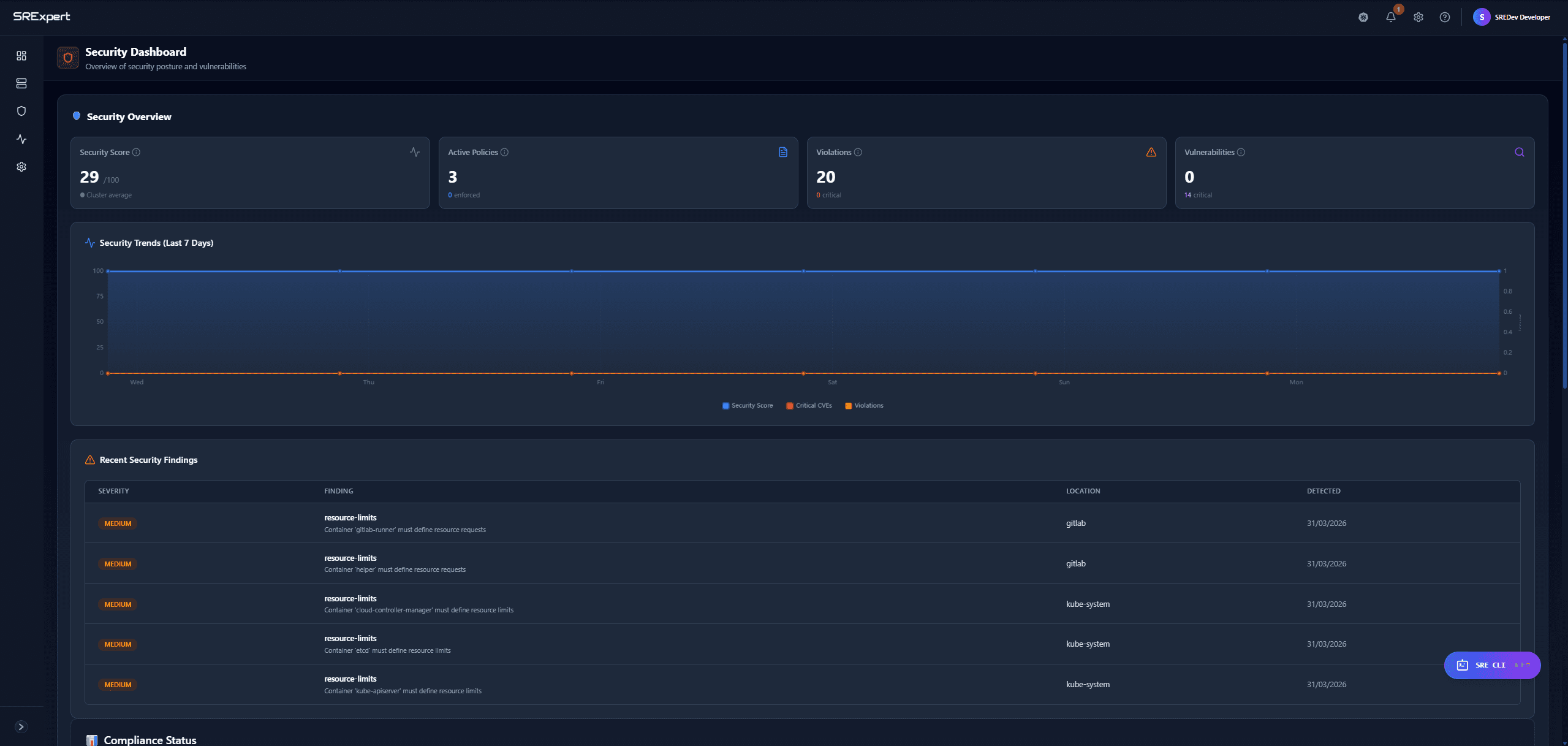
Security Dashboard & Compliance
01

Security Dashboard & Compliance

Complete security posture with CIS benchmarks, vulnerability tracking, and compliance mapping across SOC2, HIPAA, PCI-DSS, ISO 27001, NIST.
SRExpert — Full security dashboard with 7 compliance frameworks Lens — No security scanning or compliance features
AI-Powered Kubernetes Operations
02

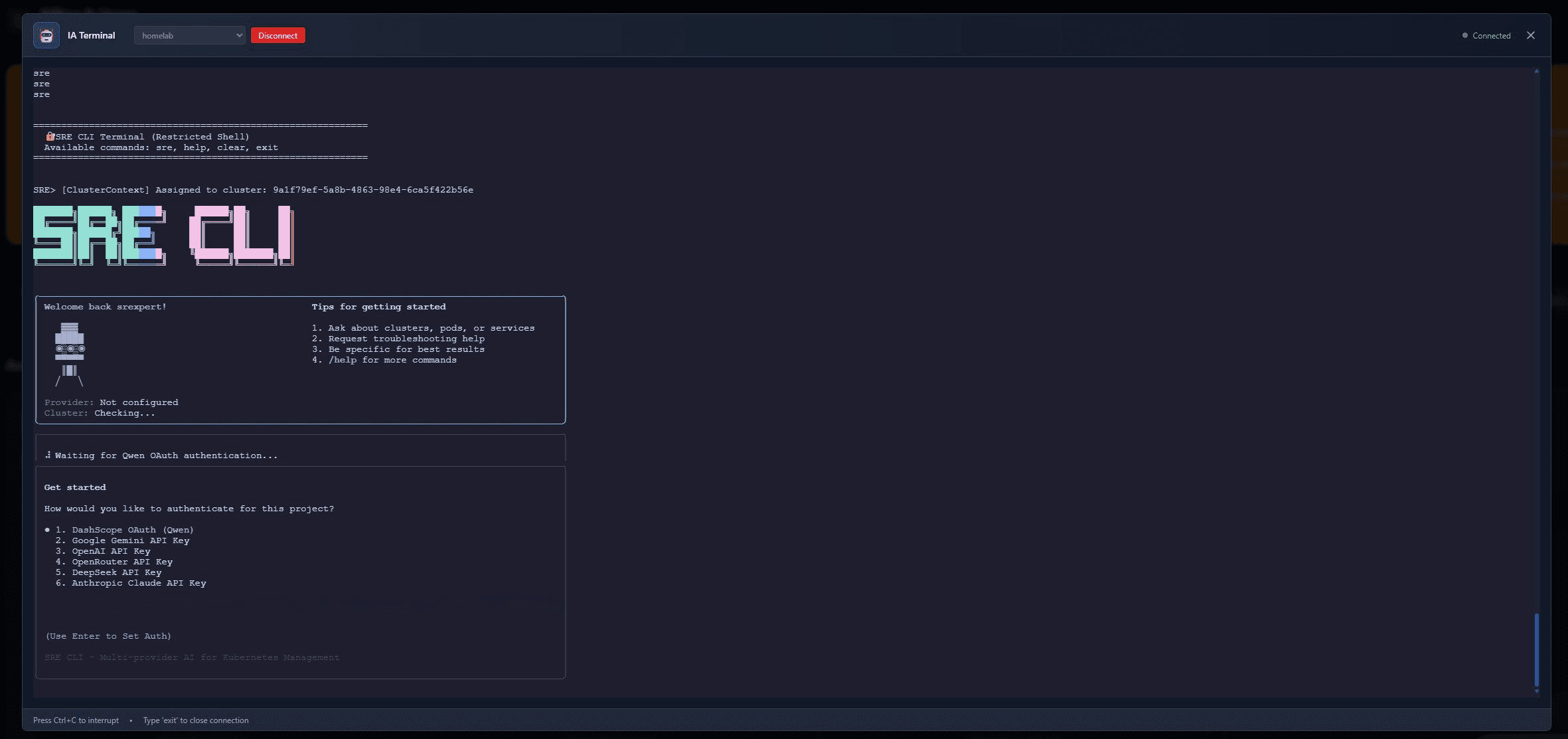
AI-Powered Kubernetes Operations

Natural language operations with 6+ AI models including Claude, ChatGPT, Gemini. Ask questions, troubleshoot issues, and manage clusters conversationally.
SRExpert — 6+ AI models with natural language operations Lens — No AI capabilities whatsoever
Admission Control & Policy Management
03

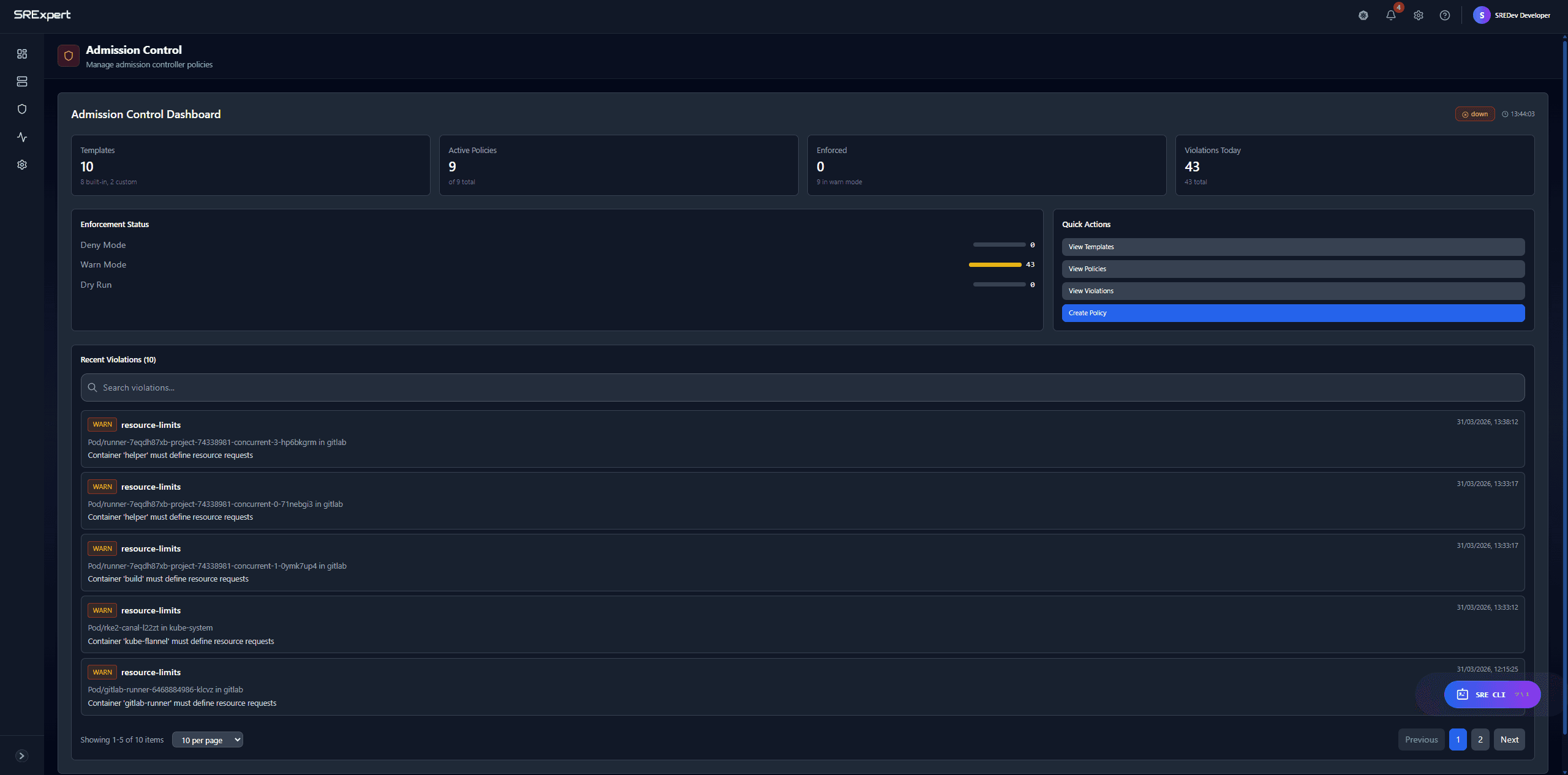
Admission Control & Policy Management

Gatekeeper policies with enforcement modes (Deny, Warn, Dry Run), real-time violation tracking, and policy templates for quick setup.
SRExpert — Full admission control with OPA Gatekeeper Lens — No policy management features
Prometheus Data Explorer
04

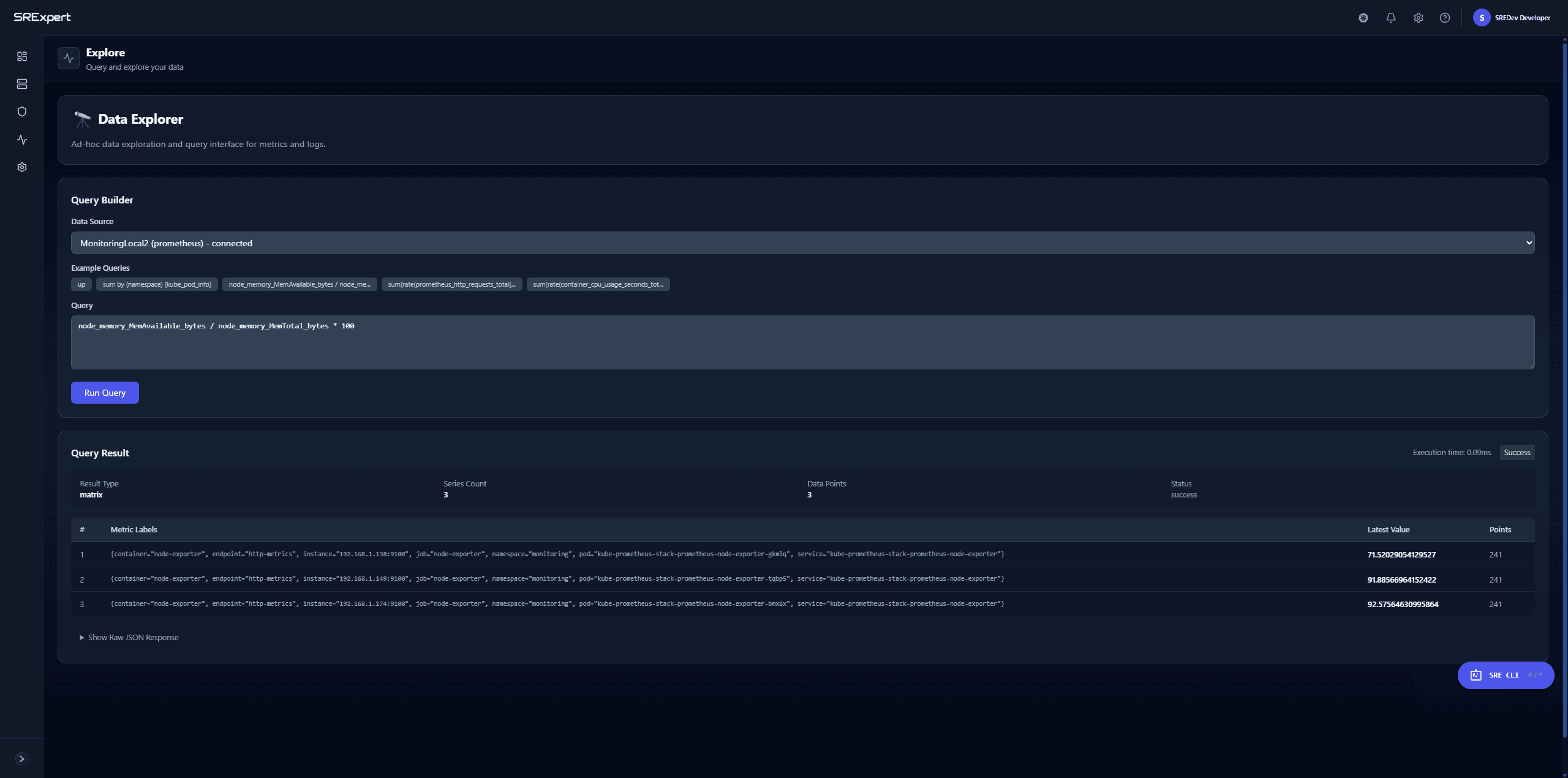
Prometheus Data Explorer

Built-in Prometheus integration with ad-hoc query builder. Run PromQL queries, explore metrics in real-time, import Grafana dashboards.
SRExpert — Built-in Prometheus + Grafana integration Lens — Only basic resource metrics
Team Collaboration & SSO
05

Team Collaboration & SSO

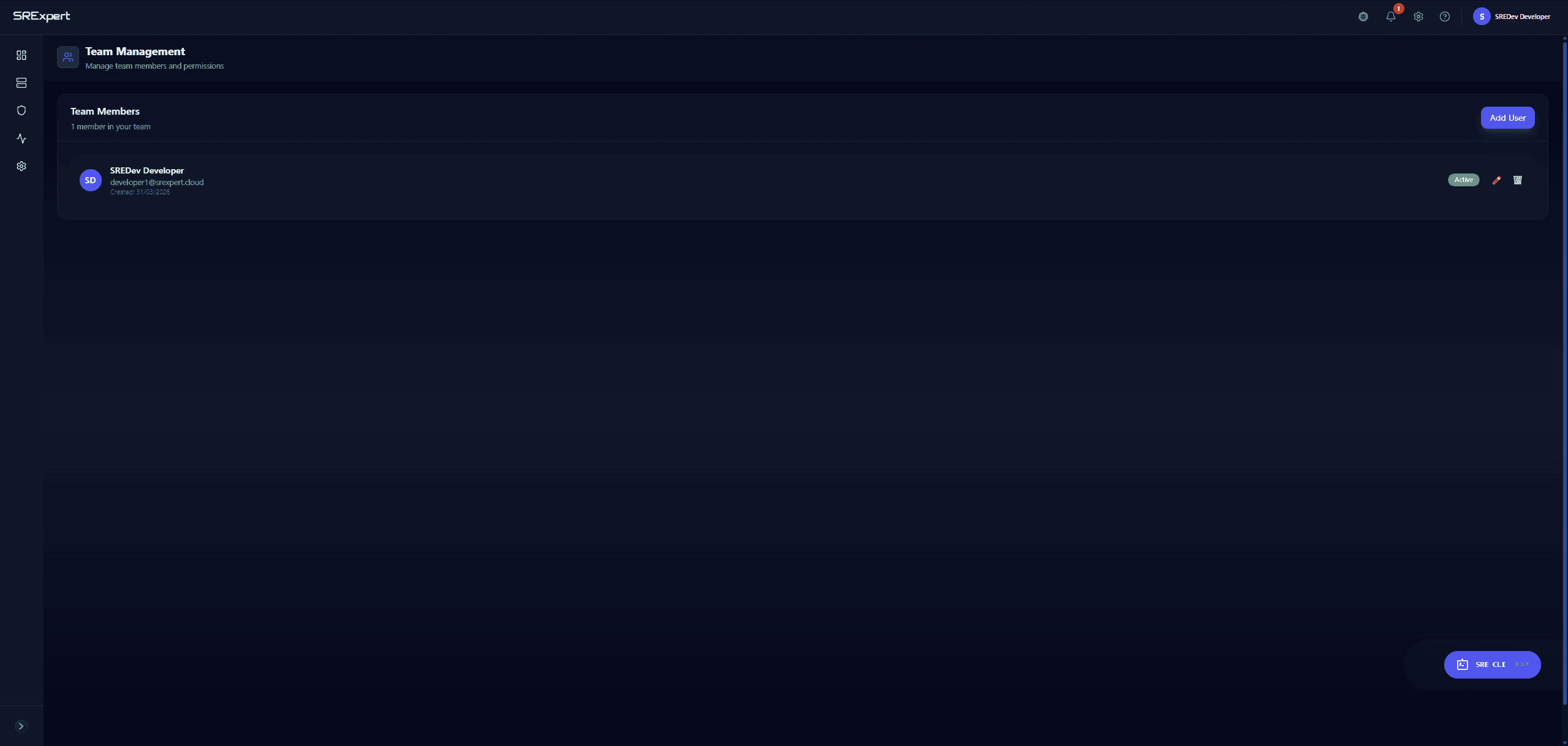
Role-based access control, shared dashboards, group management, and SSO with Microsoft Entra ID and Google OAuth.
SRExpert — RBAC, SSO, team & group management Lens — Desktop app for individual use only
Full Helm Chart Catalog
06

Full Helm Chart Catalog

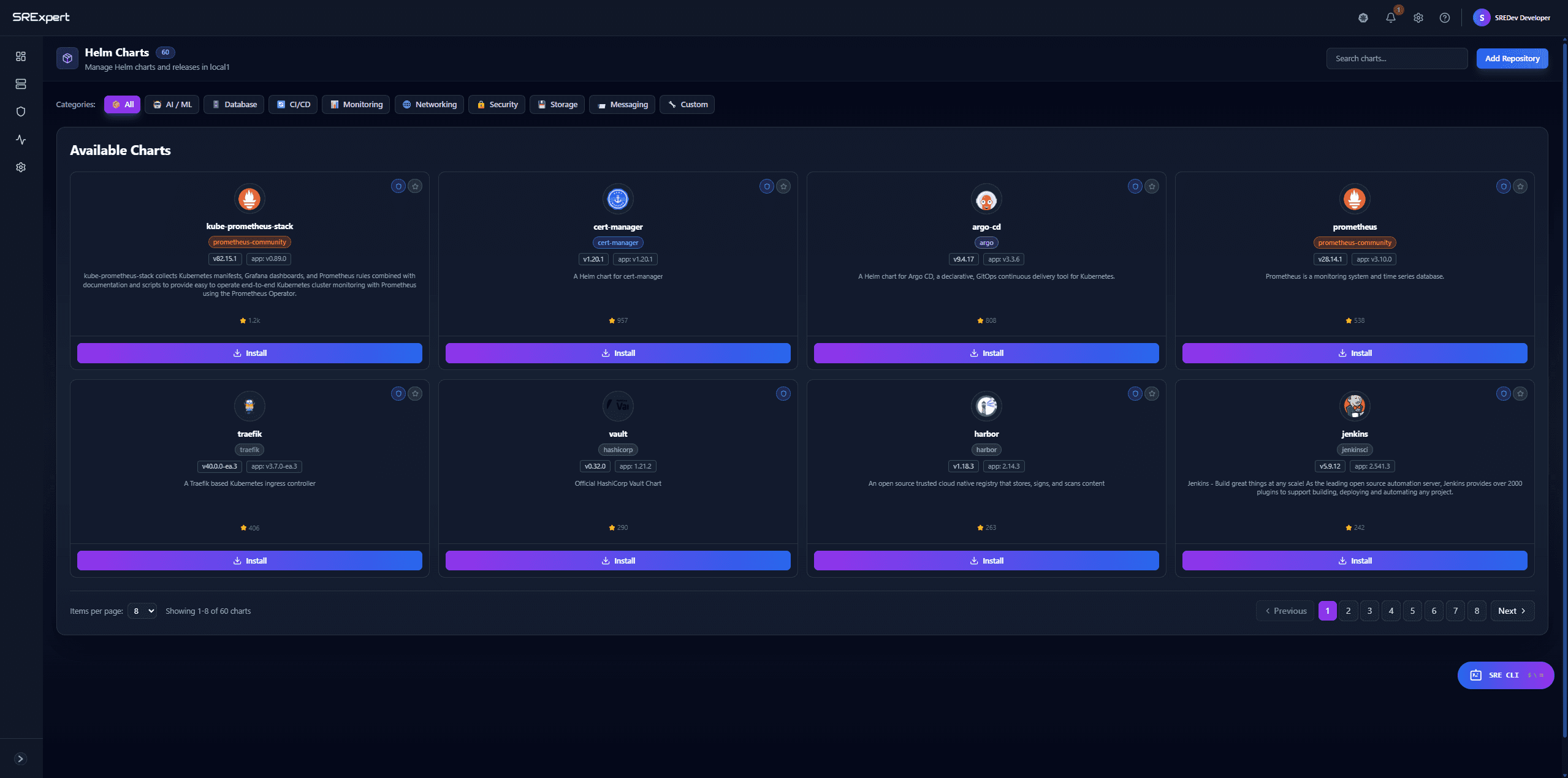
Browse, install, upgrade and rollback 60+ Helm charts with one click. Organized by categories with version management.
SRExpert — 60+ charts, one-click install, upgrade, rollback Lens — Can only view installed Helm releases
Container Image Security
07

Container Image Security

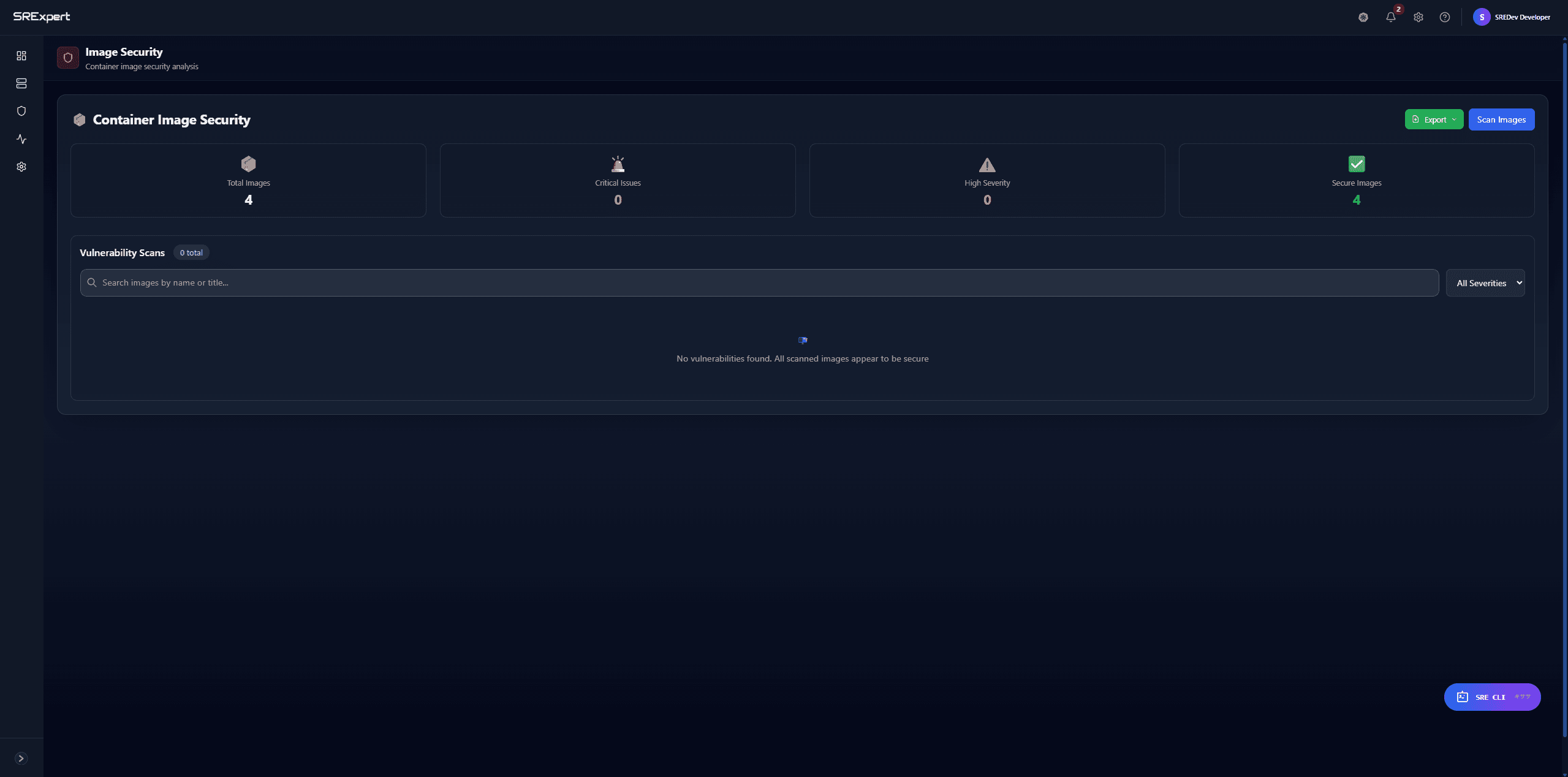
Scan container images for vulnerabilities with severity classification. Track Critical, High, Medium issues and remediation status.
SRExpert — Full container image vulnerability scanning Lens — No image security scanning
Multi-Framework Compliance
08

Multi-Framework Compliance

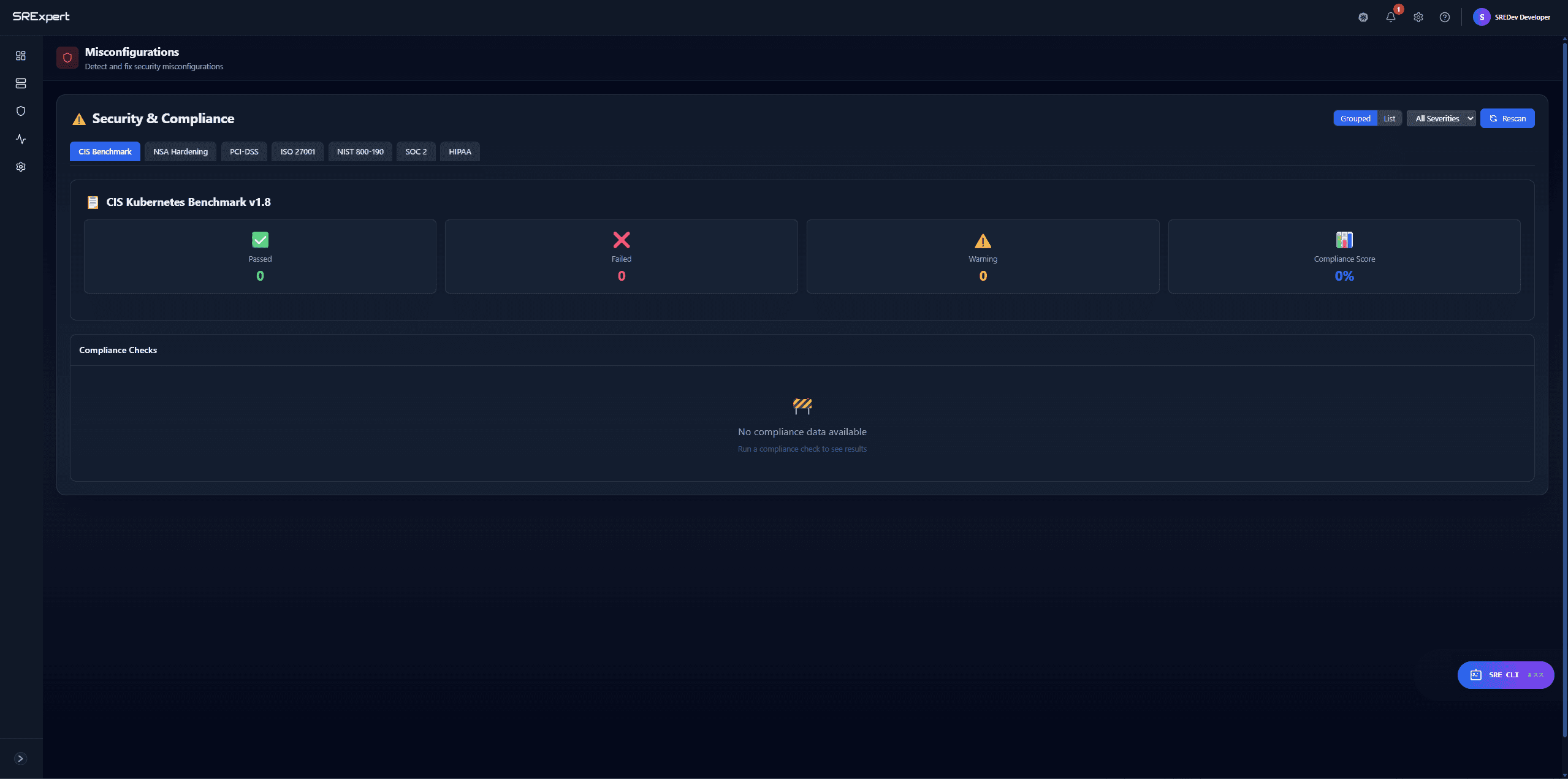
CIS Benchmark, NSA Hardening, PCI-DSS, ISO 27001, NIST 800-190, SOC 2, HIPAA — all in one dashboard with pass/fail results.

SRExpert — 7 compliance frameworks with automated checks Lens — No compliance features
Feature Comparison

SRExpert vs Lens (Mirantis)

FeatureSRExpertLens (Mirantis)
Platform TypeWeb-based team platformDesktop application for individuals
Team CollaborationRole-based access, shared dashboards, team visibilityNo collaboration features
AI Assistant6+ AI models with natural language operationsNo AI capabilities
Alerting10+ channels, deduplication, on-call schedulingNo alerting features
Security ScanningCIS benchmarks, RBAC analysis, vulnerability detectionNo security scanning
ComplianceSOC2, HIPAA, PCI-DSS, ISO 27001 mappingNo compliance features
Helm ManagementBrowse, install, upgrade, rollback with one clickView installed Helm releases
MonitoringBuilt-in Prometheus and Grafana integrationBasic resource metrics
Free TierYes - 1 user, 1 cluster, foreverFree personal edition (limited)
Self-Hosted OptionYes - Helm chart on your infrastructureDesktop only - no self-hosted server
Cluster ImportZero-firewall via secure outbound tunnelManual kubeconfig required
Incident ManagementAI-assisted root cause analysis and remediationNot available

Lens helped you see your clusters. SRExpert helps your team operate them. Start free and experience the difference a true operations platform makes.

Start free — 1 cluster, no credit card. See the difference yourself.

Book a Call See All FeaturesView Pricing
More Comparisons

SRExpert vs K9s

See how we compare

SRExpert vs Kubecost

See how we compare

SRExpert vs Wiz

See how we compare

SRExpert vs Komodor

See how we compare

SRExpert vs Rancher (SUSE)

See how we compare

SRExpert vs Lens (Mirantis)

See how we compare

SRExpert vs Datadog

See how we compare

SRExpert vs Aptakube

See how we compare

SRExpert vs Portainer

See how we compare

SRExpert vs K9s

See how we compare

SRExpert vs Kubecost

See how we compare

SRExpert vs Wiz

See how we compare

SRExpert vs Komodor

See how we compare

SRExpert vs Rancher (SUSE)

See how we compare

SRExpert vs Lens (Mirantis)

See how we compare

SRExpert

Advanced Kubernetes Platform. Reduce noise, find root causes, and cut MTTR.

Subscribe to our Newsletter

Product

  • Features
  • SRExpert Agent
  • AI Operations
  • Monitoring
  • Alerting & On-Call
  • Security & Compliance
  • Helm & Deployments
  • Cluster Management
  • Pricing

Resources

  • Documentation
  • Release Notes
  • Roadmap
  • Blog
  • Compare
  • Book a Call

Company

  • About Us
  • Contact
  • Privum Cloud
  • Privacy Policy
  • Terms and Conditions

Contact

  • R. Daciano Baptista Marques, 245
  • 4400-617 Vila N. de Gaia, Porto
  • [email protected]
  • +351 225 500 233
Privacy PolicyTerms and ConditionsContact Us

Copyright © 2026 Privum Cloud.