







Helm & Deployments
Browse, install, compare and rollback Helm releases — all from one dashboard.
Release Management
Every Helm release across your clusters — status, values, manifests, and full revision history — all in one dashboard.
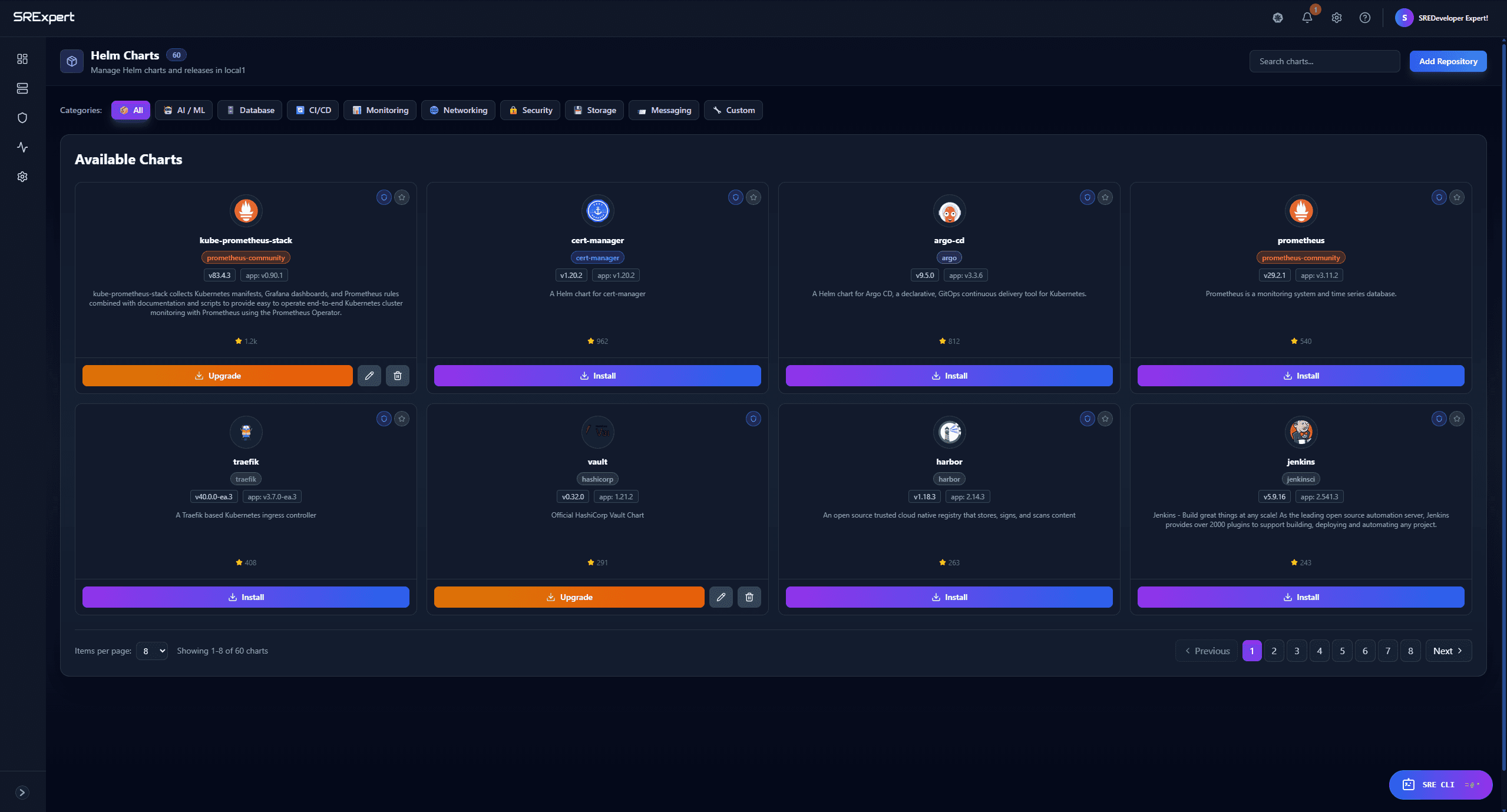
Browse, configure, and install in seconds
- Unified catalog across every repository
- Built-in YAML editor with auto-complete
- Preview default values before installing
- Deploy to any cluster in one click
Repository Management
Add Repositories
Provide a name and URL — add authentication credentials for private repos. Supports OCI registries and traditional Helm repositories like Bitnami out of the box.
SRExpert Repository
Official chart repo at nexus.srexpert.io with automatic index syncing — charts appear in the browser immediately after adding.
Chart Browser
Search across all repositories by name or keyword, inspect dependencies and default values, and jump straight to install — all without leaving the dashboard.
Search & Filter
Find charts by name, keyword, or category across all repositories. Results update as you type.
Maintainers & Source
View chart maintainers, home page, source code repository links, and icon directly in the listing.
Dependencies
Inspect the full dependency tree before installing. See required sub-charts, versions, and conditions.
Default Values
Read the chart's default values.yaml with syntax highlighting. Understand every parameter before deploying.
Values Management
Edit values with syntax highlighting and schema-aware auto-complete, then compare across revisions to trace exactly what changed and when.
View & Edit Current Values
Inspect the full values.yaml applied to any running release with syntax highlighting. Edit values directly — SRExpert runs the upgrade automatically with schema-aware auto-complete to catch errors before they reach the cluster.
Revision Diff & Drift Detection
Compare values between any two revisions side-by-side, or see what diverges from the chart's shipped defaults. Additions, removals, and changes are color-coded — spot configuration drift instantly.
Deploy in Seconds
Whether you prefer the dashboard or the CLI, SRExpert supports both workflows. Add a Helm repository, search charts, deploy with custom values, and rollback — all in under a minute.
$ helm repo add srexpert-helm https://nexus.srexpert.io/repository/srexpert-helm/
"srexpert-helm" has been added to your repositories

$ helm search repo srexpert-helm
NAME                    VERSION   DESCRIPTION
srexpert-backend        1.0.0     SRExpert Backend Services
srexpert-frontend       1.0.0     SRExpert Web Interface

$ helm upgrade --install srexpert-backend srexpert-helm/srexpert-backend -n srexpert --create-namespace --set replicaCount=3

Release "srexpert-backend" has been upgraded. STATUS: deployed  REVISION: 4

$ helm rollback srexpert-backend 2 -n srexpert
Rollback was a success! Happy Helming!

$ _
Rollback & Revision History
View History
Every revision is accessible — see when it was created, what values were applied, and whether it succeeded or failed.
Compare Revisions
Diff any two revisions side-by-side to understand exactly what changed between deployments. Color-coded additions and removals make auditing fast.
One-Click Rollback
Restore any revision — not just the previous one. Select the target, confirm, and SRExpert performs the Helm rollback with health checks.

Start with SRExpert today
Connect your first cluster in 5 minutes. See every workload, enforce security policies, and let AI handle the noise.
Replace your monitoring stack, alerting tools, and compliance spreadsheets with one platform built for Kubernetes teams.
Free 30-day trial — no credit card needed.