







Cluster Management
Monitor, compare and bulk-manage every cluster — EKS, AKS, GKE, on-premise.
Unified Multi-Cluster Dashboard
Add any Kubernetes cluster via kubeconfig — managed (EKS, AKS, GKE), self-hosted (on-premise), or local (minikube, kind). Configure sync intervals, API timeouts, custom labels, and cluster-specific notification settings. Switch between clusters seamlessly.
Real-Time Status for Every Component
Connection Status
Every cluster reports one of four statuses: Connected, Disconnected, Error, or Syncing. When a cluster transitions to Error, notifications fire through Slack, email, Teams, or webhooks so the right people know immediately.
Control Plane Components
SRExpert monitors the API Server, etcd, Scheduler, and Controller Manager individually. Pinpoint exactly where a problem lies — if your Scheduler is healthy but etcd is degraded, you see it at a glance.
Node & Pod Health
Full breakdown of pod status (Running, Pending, Failed, Succeeded, Unknown) and node conditions (Ready, MemoryPressure, DiskPressure, PIDPressure). Identify infrastructure issues before they cause evictions.
Resource Distribution Across Namespaces
Resource Distribution
For each namespace, SRExpert displays CPU and memory consumption — both requests and actual usage — so you can identify which teams or services are consuming the most resources and where there is waste. Especially valuable in multi-tenant clusters where cost allocation matters.
Quota Management
ResourceQuotas are surfaced directly in the UI so you can see at a glance how close each namespace is to its limits. No more running kubectl describe quota across dozens of namespaces. The visual breakdown makes capacity planning straightforward and prevents resource contention.
Full Control Over Every Workload Type
Manage Deployments, StatefulSets, DaemonSets, ReplicaSets, Jobs, CronJobs, and Pods — all from one interface.
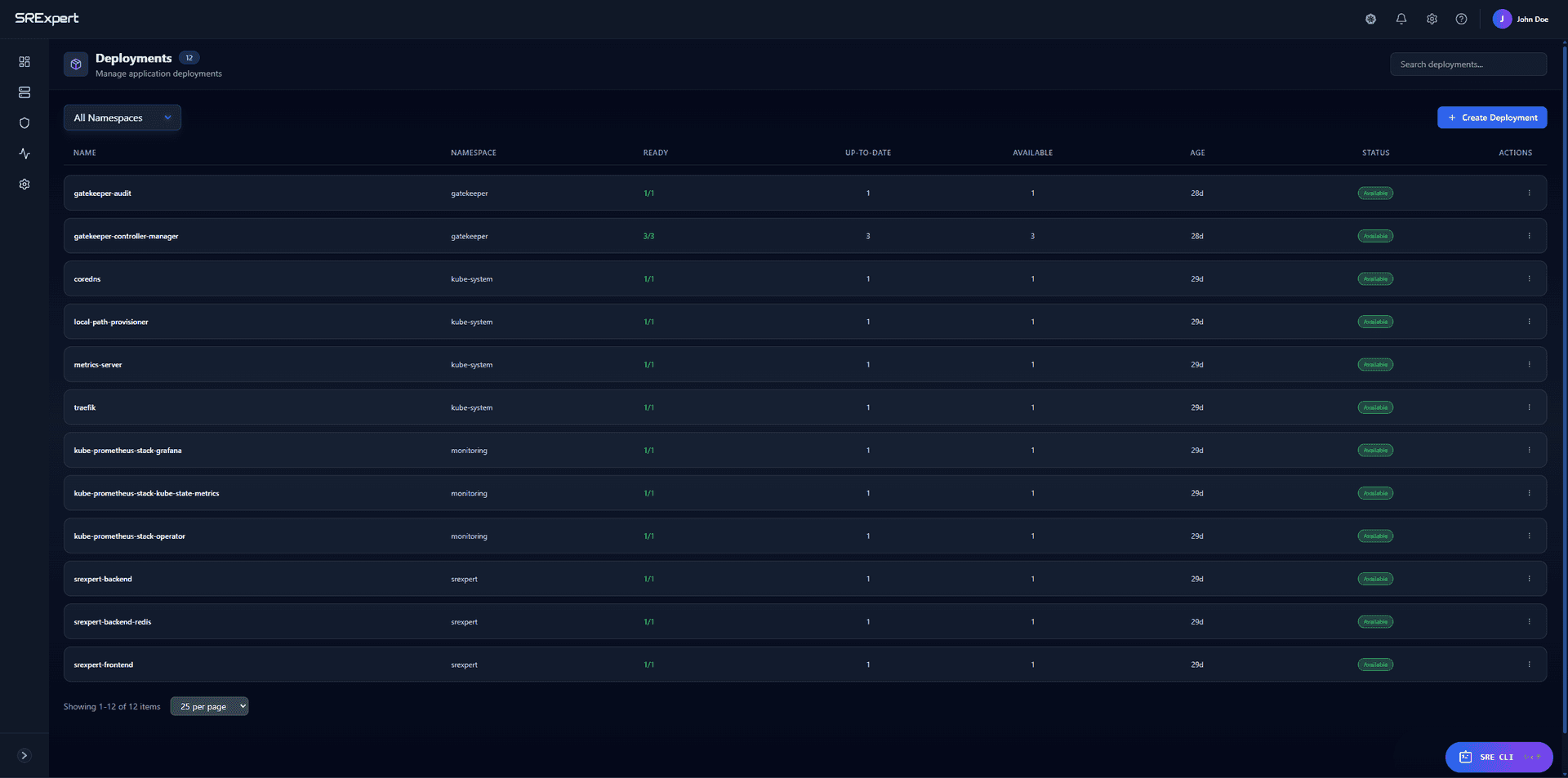
Deployments
Scale replicas up or down with a single click, trigger rolling updates by changing the container image, and rollback to any previous revision if something goes wrong. SRExpert shows the full revision history with timestamps and change details so you always know exactly what changed and when. You can also pause and resume rollouts to control the pace of updates across your fleet.
StatefulSets & DaemonSets
StatefulSets get the same visual management as Deployments, with awareness of ordered pod creation and persistent volume claims. DaemonSets show you which nodes are running the daemon pod and which are not, making it easy to verify that your logging agents, monitoring collectors, or network plugins are deployed everywhere they should be. Filter by node labels to see exactly where each DaemonSet is active.
Jobs & CronJobs
View active, completed, and failed Jobs with their pod logs and exit codes. CronJobs show the schedule expression, last execution time, next scheduled run, and recent execution history. You can suspend and resume CronJobs, manually trigger a run, and inspect the pods created by each execution — all without touching kubectl. Failed jobs surface immediately in the dashboard with their error output.
ReplicaSets
While most teams interact with Deployments, sometimes you need to inspect the underlying ReplicaSets directly. SRExpert shows the relationship between Deployments and their ReplicaSets, the number of desired vs. ready replicas, and lets you trace pod ownership back to the originating workload. This is invaluable when debugging rollout issues or investigating why old ReplicaSets still have pods running.
Deep Visibility Into Every Pod
Advanced Filtering
Filter by status (Running, Pending, Failed, Succeeded, Unknown), namespace, node, or labels. Combine multiple filters to zero in on exactly the pods that matter in clusters with hundreds or thousands of pods.
Real-Time Logs
Container logs streamed live in the browser. Search within logs, download for offline analysis, and switch between init, sidecar, and ephemeral containers — each with its own log stream to trace the full pod lifecycle.
Terminal in Browser
Exec into any running container directly from the dashboard. Open a shell, run diagnostic commands, inspect files, and check network connectivity — ideal for on-call engineers who need quick access without local kubectl setup.
Bulk Actions
Delete, scale, or label multiple pods at once across any namespace. Select pods individually or by filter criteria and execute operations in batch — no more repetitive kubectl commands one pod at a time.
Connect Any Cluster Without Opening Ports
Outbound Only
Your cluster initiates the connection to SRExpert — never the other way around. No inbound firewall rules, VPN tunnels, or IP whitelisting required. Works behind corporate firewalls, NATs, and air-gapped networks with a single outbound HTTPS port.
mTLS Encryption
All communication is encrypted with mutual TLS. Each agent gets a unique certificate authenticating both sides, preventing MITM attacks. The tunnel is persistent and auto-reconnects if the connection drops — zero visibility gaps.
Helm Deploy
A single Helm command installs the agent into a dedicated namespace. Provide the cluster token from the SRExpert UI and the agent handles the rest — establishing the tunnel, discovering workloads, and streaming data. Under two minutes to a fully connected cluster.
Import a Cluster in Minutes
Use the SRExpert Helm chart to deploy the agent. Outbound-only tunnel — nothing to expose.
$ helm repo add srexpert \
    https://nexus.srexpert.io/repository/srexpert-helm/
"srexpert" has been added to your repositories

$ helm install srexpert-agent srexpert/srexpert-agent \
    --set token=<YOUR_CLUSTER_TOKEN> \
    --set server=https://api.srexpert.cloud \
    -n srexpert-system --create-namespace

NAME: srexpert-agent
STATUS: deployed
NAMESPACE: srexpert-system

$ kubectl get pods -n srexpert-system
NAME                              READY   STATUS    RESTARTS   AGE
srexpert-agent-6b8f9d4c7-x2k9p   1/1     Running   0          45s
srexpert-tunnel-8d7f6e5a3-m4n7q   1/1     Running   0          42s

$ srexpert cluster status
✓ Cluster "prod-eks-us-east" connected
✓ Tunnel: active (outbound-only)
✓ Workloads discovered: 47 pods, 12 services, 8 deployments

$ _
Documentation
Go deeper in the SRExpert docs:

Start with SRExpert today
Connect your first cluster in 5 minutes. See every workload, enforce security policies, and let AI handle the noise.
Replace your monitoring stack, alerting tools, and compliance spreadsheets with one platform built for Kubernetes teams.
Free 30-day trial — no credit card needed.